Docker Basics For Beginners

Back in the days when the development team usually faced problems during the development, like the developers might have all those dependencies required to run the application they are developing but for the testing team, it might not run properly because they don't have all the required dependencies. Docker solves this problem, now you don't have to worry about dependencies or running a virtual machine. But before learning about Docker, we should learn about Containers or Containerization.
CONTAINERS
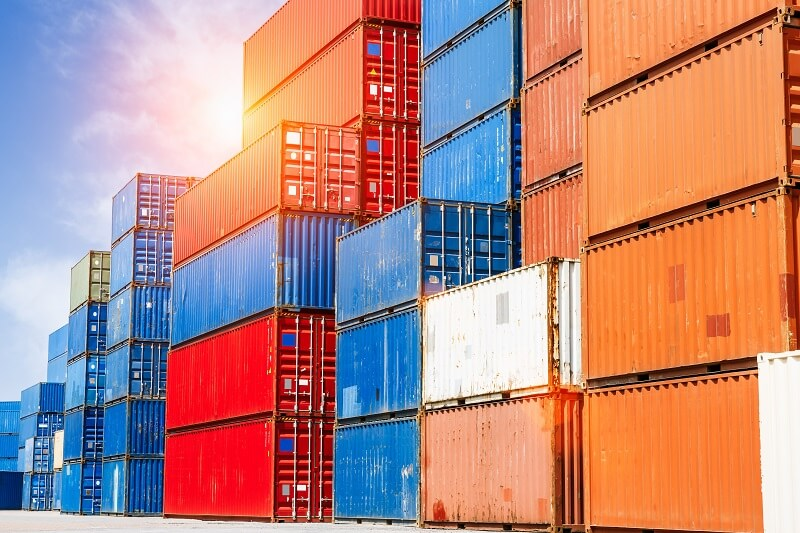
A container is an executable unit of software in which application code is packaged along with its lib and dependencies, in common ways to say it can run anywhere and anytime. And it works on the concept of advanced virtualization. There are many platforms providing containerization services but out of all, Docker is the most widely used because of its features.
CONTAINERS Vs VIRTUAL MACHINE
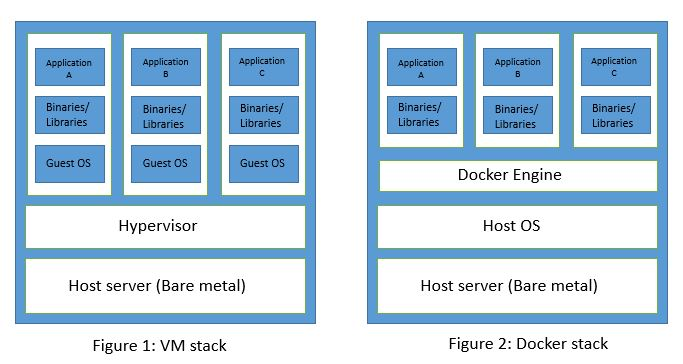
The interesting part about containers is it's working, like a virtual machine they too work on host Os but here's the interesting part, for containers you don't have to worry about setting up configurations and containers share the same kernel with host Os. Since VM uses a separate OS; it causes more resources to be used and therefore virtual machines don’t start quickly and lead to poor performance whereas containers result in high-performance as they use the same operating system with no additional software. In terms of performance, speed, and portability containers are better than virtual machines. But still, containers have a few disadvantages over virtual machines, because of which in many scenarios VMs are preferred.
DOCKER
 Docker is an open-source centralized platform, designed to create, deploy and run applications. It uses host Os, rather than creating a whole virtual Os and can be installed on any Os but Docker Engine runs natively on Linux. Written in Go language, it performs Os level virtualization, known as containerization, and also Docker is a PaaS (Platform as a Service).
neji@ubuntu:~$ docker

Usage:  docker [OPTIONS] COMMAND

A self-sufficient runtime for containers
ADVANTAGES OF DOCKER
As we discussed earlier while creating a virtual machine, we have to pre-allocate RAM for that machine but in Docker, there is no need for pre-allocation of RAM. This also saves our time and money by allowing us to build a container image and use the image across every step of the deployment process. With the help of Docker, now you don't have to worry about configuring or setting up an environment for testing or development. Also, containers are lightweight because of which the process of transferring files on the host’s filesystem is easier. And also, the application in Docker containers starts with no delay since the OS is already up and running.
DISADVANTAGES OF DOCKER
Docker has many advantages but it also has a few disadvantages, the major issue is Cross-platform compatibility, which means if an application is designed to run in a Docker container on Windows, then it can’t run on Linux or vice versa. Also, Docker isn't a good solution for application that requires rich GUI, In general, Docker is designed for hosting applications that run on the command line.
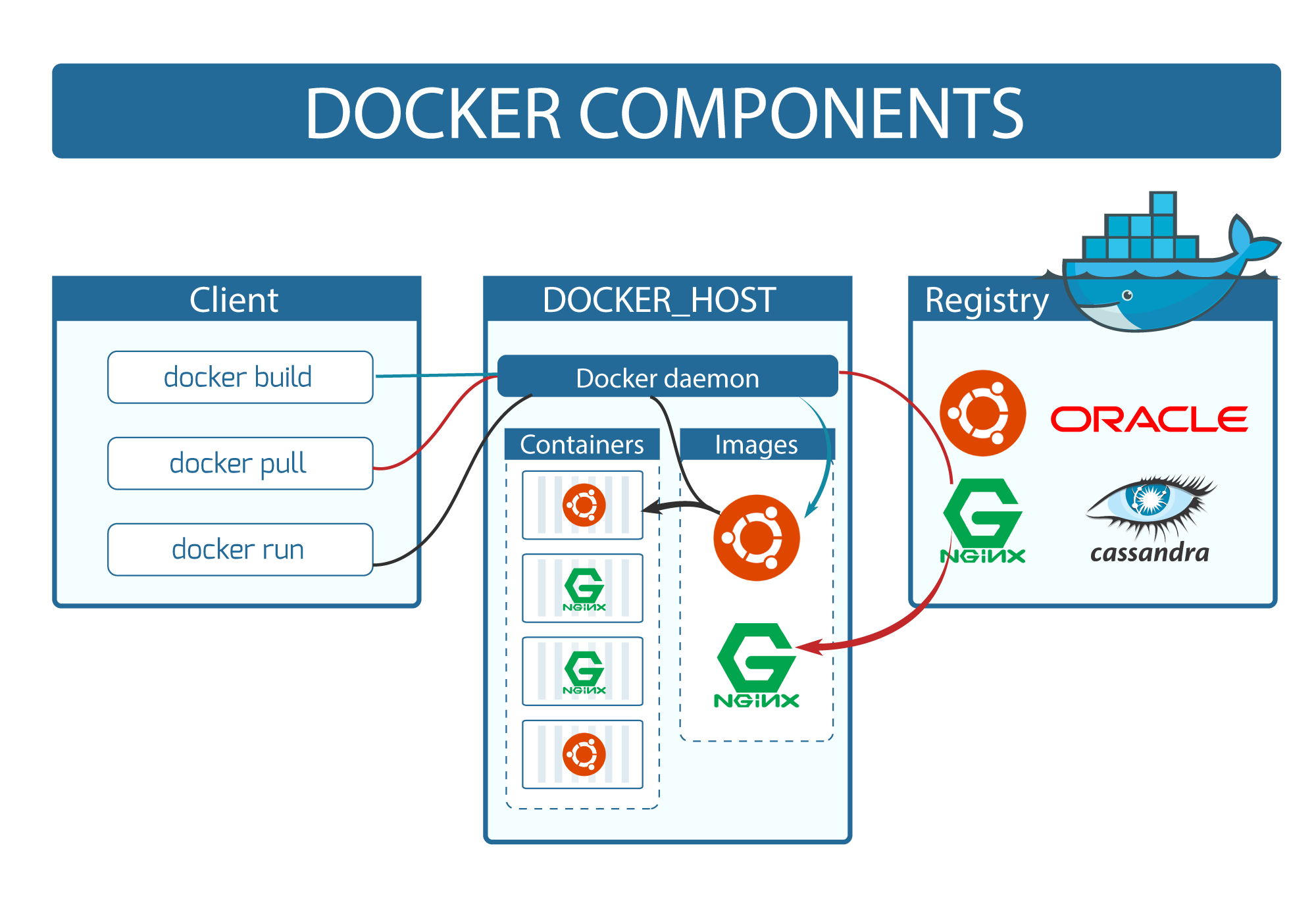
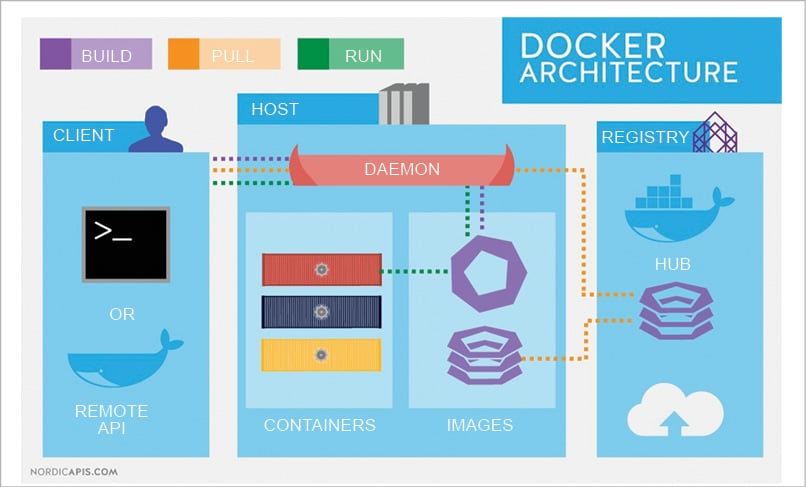
ARCHITECTURE
BASIC COMMANDS
docker –version (Display the current version.)
docker pull (Docker repository images can be pulled using the docker pull command.)
docker run -it --name (For generating a container from an image.)
docker start [container] (lets the user start a particular container.)
docker exec -it bash (Command for accessing the running container.)
docker ps -a (Displays running and exited containers.)
docker kill (Command for stopping the execution of a container immediately.)
docker images (Listing all images stored in a docker.)
docker rm (Deleting a container that has stopped execution.)
docker commit (This command creates a new image of an edited container on the local system.)
docker push (This Docker command is used to push an image to the Docker hub repository.)
COMPONENTS OF DOCKER
1. DOCKER DAEMON
Docker Daemon or Docker Engine is responsible for creating and running containers to manage Docker services. It is also responsible for managing Docker images, storage volumes, and networks. The Docker daemon constantly listens for Docker API requests and processes them. The daemon is responsible for all container-related actions and receives commands via the CLI or the REST API. It can also communicate with other daemons to manage its services. The Docker daemon pulls and builds container images as requested by the client.
2. DOCKER CLIENT
Users can interact with Docker Daemon through CLI or can use REST API to communicate with Docker Daemon. It is also possible for Docker clients to communicate with more than one daemon.
3. DOCKER HOST
It is used to provide an environment to execute and run applications. It contains Docker daemon, Images, Containers, Networks, and Storage.
4. DOCKER HUB/ REGISTRY
It is responsible for managing and sharing the Docker images. It is a service from where we can pull images and also push images. It is of two types, Public - for everyone and Private for enterprises.
5. DOCKER IMAGES
They are read-only binary templates used to create Docker containers or a single file with all dependencies and configurations required to run a program.
WAYS TO CREATE A DOCKER IMAGE
- Create an image from a Docker file, using Docker build command we can ask the Docker
neji@ubuntu:~/Documents/Docker$ docker build -t newimg .
Sending build context to Docker daemon  2.048kB
Step 1/2 : FROM ubuntu
 ---> 54c9d81cbb44
Step 2/2 : CMD ["echo Hello"]
 ---> Using cache
 ---> bca3c3bc1290
Successfully built bca3c3bc1290
Successfully tagged newimg:latest
- Run the docker images using the Docker run command. Whenever we pass the command to the Docker client then the docker client passes this command to the Docker daemon and it will
neji@ubuntu:~$ docker pull fedora
Using default tag: latest
latest: Pulling from library/fedora
edad61c68e67: Pull complete
Digest: sha256:40ba585f0e25c096a08c30ab2f70ef3820b8ea5a4bdd16da0edbfc0a6952fa57
Status: Downloaded newer image for fedora:latest
docker.io/library/fedora:latest
- We can push the image to the Docker registry using the Docker push command and from the Docker registry, we can pull the image using the Docker pull command.
$ docker push [OPTIONS] NAME[: TAG]
docker pull <image> – Docker repository images can be pulled using the docker pull command.
DOCKER CONTAINERS
A container is a runnable instance of an image. You can create, start, stop, move, or delete a container using the Docker API or CLI. It is responsible for holding the entire package that is needed to run the application. You can connect a container to one or more networks, attach storage to it, or even you can create a new image based on those containers.
DOCKER FILE
A Docker file is a text file that is used to create a Docker image with the help of the Docker build command. It contains some set of instructions, following the instructions the Docker daemon creates an image.
Docker file contains specific commands that work as instructions for Docker daemon to build an image. Few basic commands :
FROM, PULL, RUN, and CMD
- FROM - Creates a layer from the ubuntu:18.04
- PULL - Adds files from your Docker repository
- RUN - Builds your container
- CMD- Specifies what command to run within the container
Very basic example of Docker file
FROM ubuntu

MAINTAINER Neji

RUN apt-get update

CMD ["echo", "Welcome to BHARAT"]
NEXT ??
Well, it was just a basic introduction, there's more to learn about Docker. There are many resources, which can help you in learning Docker, in this article I just shared some basics. **